Aetherfold gives the world four spatial directions. Start with a sheet of paper, move a bridge into view and turn a tesseract. Then try the same ideas with Elowen.
01 / Coordinates
Four numbers place you in the world.
Picture giving directions through an abbey. X tells you how far left or right, Y how high, and Z how far forward or back. Aetherfold adds W, one more independent direction. Two objects can share the same X, Y and Z and still be separated along W.
X
Left and right
Y
Down and up
Z
Back and forward
W
The fourth spatial direction
Try a thought experiment. If one door sits at W = 0 and another at W = +4, walking straight ahead changes Z. You can reach the second door by changing W.
02 / Cross-sections
Pass a sphere through a sheet of paper.
Where the sphere meets the paper, it leaves a circular cross-section. The circle is small near either end and largest through the middle. Aetherfold takes this one dimension higher. The cross-section of a 4D chamber is the 3D place you can walk through.
Near the edgeA small circle appears.
Through the centerThe circle is at its widest.
Outside the sheetThe intersection disappears.
The dotted outline shows the whole sphere. The filled oval shows the circle in perspective.
03 / Translation
Bring a bridge into your slice.
Move the slider and watch what changes. Both landings extend across a range of W. The bridge spans only W +3 to +5, so you can walk across when you enter that range.
Interactive model / View along W
Try it
Find the crossing.
Move the slider. The two landings extend across W. The bridge occupies a shorter span, from +3 through +5.
A gap separates the two landings.
Try this. Start at W = 0, stop at +4, then continue to +6. The bridge appears and disappears while the landings stay in place.
04 / Rotation
Turn a tesseract through W.
A tesseract is the 4D analogue of a cube. This drawing projects all 16 corners and 32 edges onto your screen. In the game, you see only the chamber’s intersection with your current slice.
Moving along W changes where the slice sits. Turning in XW or ZW changes its orientation through the world. That can bring an object into reach from a different angle.
Interactive model / Tesseract projection
Try it
Two planes. Two turns.
Turn X toward W, then Z toward W. The diagram projects the whole shape. The game shows what intersects your slice.
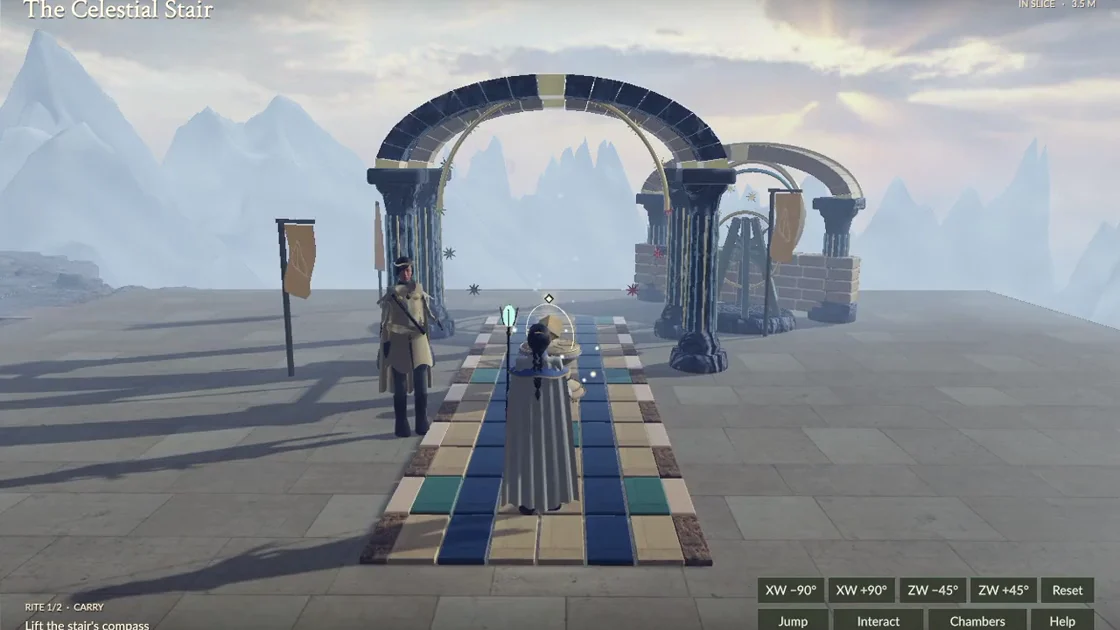
Watch the Celestial Stair come into view as Elowen moves along W. In the early chambers you’ll learn to turn the slice first. Later realms introduce direct movement along the fourth direction.
ΔW is the difference between your W position and the active rite’s W position. Use it as a clue, then look for a physical route to the rite. At the Celestial Stair, hold C until W reaches +3, then climb.

 Play The Celestial Stair